
Automatically learns normal behavior per metric and alerts on deviations. Correlates anomalies with other metrics for instant context. AI-powered discovery wizard finds what to monitor. No static thresholds. No manual tuning. Deploy in minutes.
AI Monitor tells you something is wrong. Log Processor tells you why.
View Pricing Learn More
Subscribe to metrics, let ML learn, get alerted when something deviates.
Per-day-of-week Random Cut Forest models learn that "Mondays are busier than Sundays." Separate baselines per day eliminate weekly pattern false positives. Adapts continuously — no retraining needed.
CloudWatch Metric Streams → Firehose → S3 → Lambda → OpenSearch. Sub-minute latency. Editor syncs stream filters — only pay for namespaces you subscribe to.
When an anomaly fires, automatically checks what other metrics also deviated in the same time window. Alert includes correlated metrics — "CPU spiked and 3 other metrics were also anomalous."
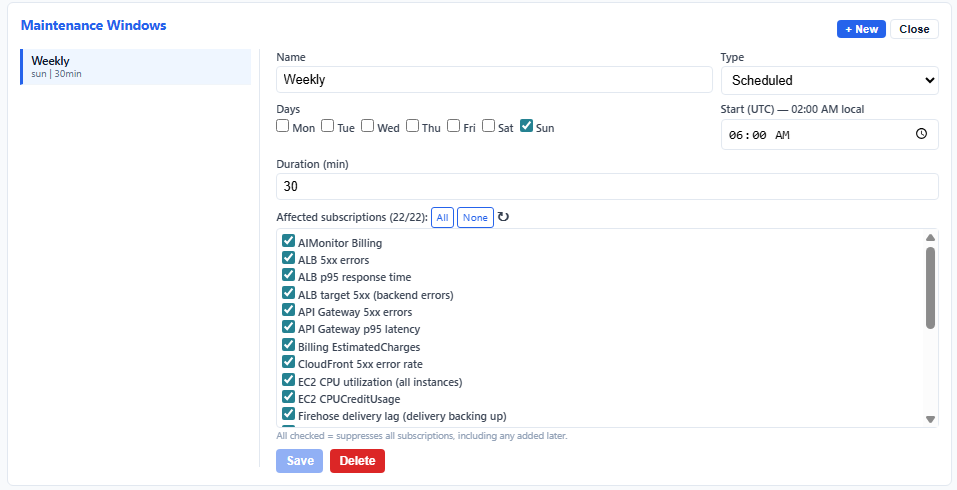
Schedule recurring or one-time maintenance windows. Anomalies during these windows are suppressed — no alert noise during planned deployments.
Web UI to browse CloudWatch namespaces, select metrics + dimensions, set sensitivity thresholds, generate/schedule reports and manage maintenance windows. Secured with Cognito authentication — one subscription can monitor all resources independently.
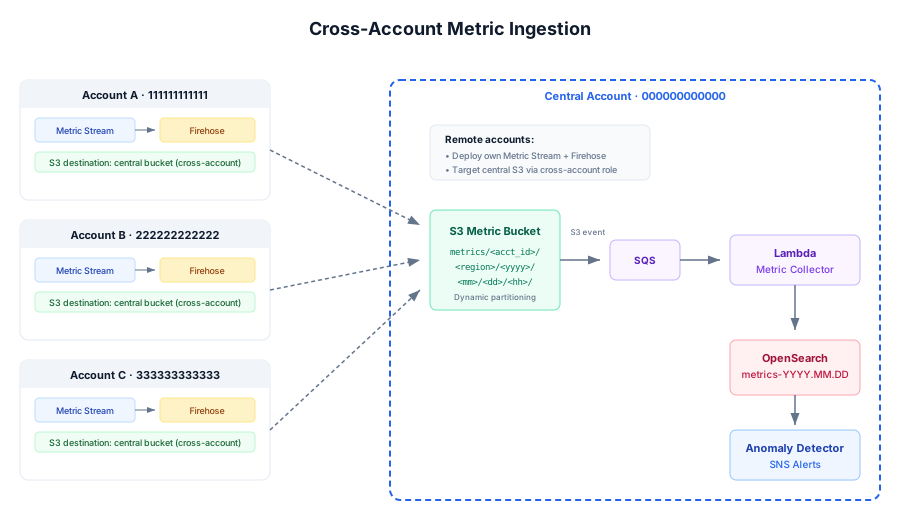
Remote accounts stream metrics into your central Firehose via a cross-account IAM role. S3 partitioned by account/region/date/hour — full visibility from one pane.
Editor save updates the Metric Stream's IncludeFilters to only stream subscribed namespaces. Zero subscriptions = stream stopped. Minimizes Firehose/S3 costs.
Two products, one story. AI Monitor detects metric anomalies; Log Processor surfaces the root cause from your logs. Deploys as a guest on Log Processor's VPC and OpenSearch — shared infrastructure, zero duplication, single-pane visibility across metrics and logs.
Daily billing processor computes day-over-day spend deltas per AWS service. Detects unusual cost spikes using day-of-week baselines — "RDS costs 3x more than a normal Thursday."
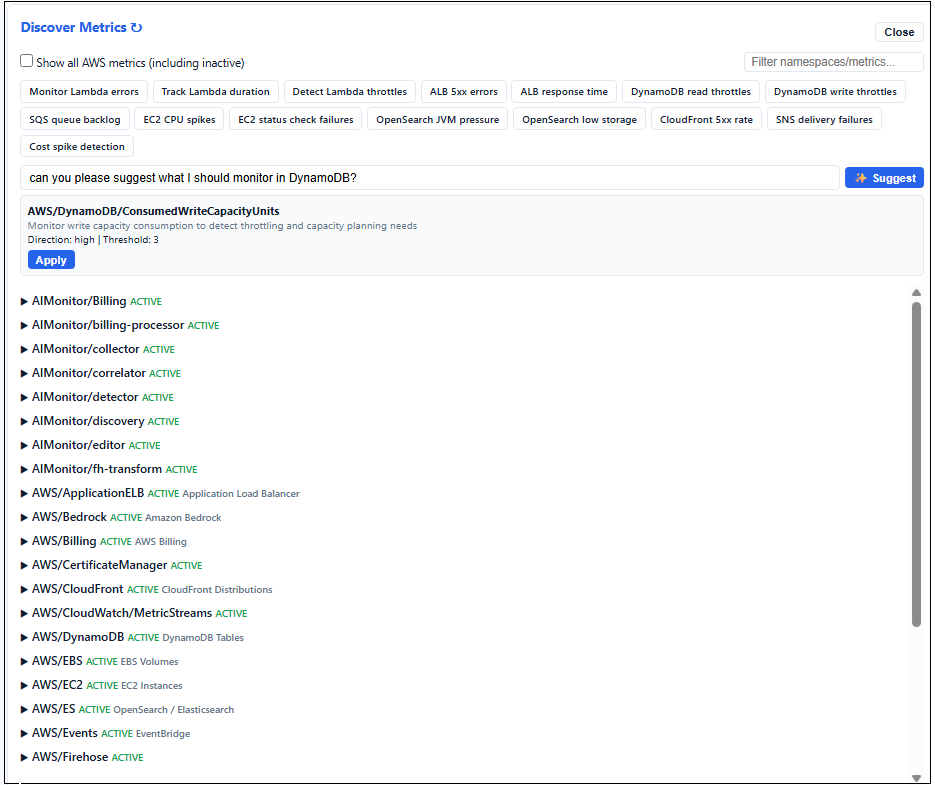
Scans your account for all available CloudWatch metrics. Browse namespaces, see what's active, click to subscribe. Suggested prompts pre-fill subscriptions with smart defaults — or type what you want in natural language and let AI configure it (advanced+).
Scheduled or on-demand HTML reports with severity breakdown, day-of-week trends, top anomalous metrics, per-account breakdown, cost analysis, maintenance window stats, baseline training status, and system health checks.
Centralize Metrics from multiple AWS accounts into a single pipeline.
Launch the CloudFormation template. Provide your Log Processor stack name and tier.
Open the editor, browse namespaces, select metrics. The Metric Stream starts flowing.
The detector builds a model per metric over the training period (7-14 days). No alerts during this phase.
Once baseline is ready, deviations trigger alerts with anomaly score + correlated metrics.
Software fee only. AWS infrastructure costs (Firehose, S3, Lambda) billed directly by AWS.
Yes. AI Monitor deploys as a guest on a running Log Processor stack — it uses the same VPC, subnets, and OpenSearch domain via SSM parameter lookup. The Log Processor owns the cluster; AI Monitor writes to its own index pattern (metrics-*) and reads other metric baselines for correlation.
Yes. Add your SAML or OIDC identity provider to the Cognito User Pool using the sso helper script. Users will see a “Sign in with [Provider]” button on the login page. After first login, assign groups with groups for role-based access. See the helper scripts README for details.
Each metric subscription gets its own Random Cut Forest model that maintains a sliding window of recent values. After the baseline period, the detector computes a z-score based anomaly score (0-10) for each new datapoint. Scores above the configurable threshold (default 3.0) trigger alerts. The model continuously adapts — daily patterns, gradual drift, and weekly cycles are learned automatically via per-day-of-week baselines.
When an anomaly is detected (compact tier and above), the correlation engine checks which other subscribed metrics also showed unusual behavior in the same time window (z-score > 2.0). The alert includes these correlated metrics with their deviation scores — helping you determine if an anomaly is isolated or part of a broader incident.
Create recurring schedules (e.g. "Wednesdays 02:00-04:00 UTC") or one-time windows in the editor. Anomalies detected during these periods are recorded but suppressed — no alerts fire. Apply windows globally or to specific subscriptions.
No. Everything runs inside your VPC. Metric Streams → Firehose → S3 → Lambda → OpenSearch — all within your account. The only external call is a periodic Marketplace entitlement check.
On advanced/enterprise tiers, provide remote account IDs during deployment. The stack creates a cross-account IAM role that remote accounts assume to PutRecord into your Firehose. Remote accounts deploy their own CloudWatch Metric Stream targeting this role. Data lands in S3 partitioned by source account ID — all metrics queryable from a single OpenSearch instance.
The editor immediately updates the CloudWatch Metric Stream's IncludeFilters to only stream namespaces with active subscriptions. Adding the first subscription in a namespace starts streaming; removing the last stops it. Zero subscriptions = stream paused entirely — no Firehose/S3 costs when idle.
Yes. Each AI Monitor stack is fully independent — deploy multiple stacks with different names, each paired to a specific Log Processor instance. For example, deploy AIMonProd targeting LogProcProd and AIMonDev targeting LogProcDev. Each gets its own metric stream, Firehose, S3 buckets, DynamoDB, editor, ALB, and Cognito. No resource collisions, no shared state. Useful for separate environments (dev/staging/prod), different teams, or different AWS accounts with their own Log Processor deployments.
Yes. The alert topic is a standard SNS topic — add your own subscriptions for any protocol SNS supports: HTTPS (webhooks), Lambda, SQS, SMS, etc. For Slack/Teams, use AWS Chatbot or subscribe an HTTPS endpoint to the topic with your webhook URL. For PagerDuty/OpsGenie, subscribe their SNS integration endpoint. You can have email and webhook subscribers active simultaneously.
Every alert includes SNS message attributes: severity (high/medium/low), score (0-10), namespace, metricName, subscriptionId, description, and accountId. Use SNS subscription filter policies to route by any combination — for example, only page on-call for {"severity": ["high"]} (score ≥ 7), route a specific subscription to a dedicated Slack channel, or escalate only production account anomalies.
Yes. Subscribe a Lambda function, SQS queue, or HTTPS webhook to the SNS alert topic. Use SNS filter policies on message attributes (severity, score, namespace, metricName) to trigger specific automations — for example, auto-scale an ECS service only when {"severity": ["high"], "namespace": ["AWS/ECS"]}, create a Jira ticket for all anomalies, or invoke a Step Functions workflow for multi-step remediation. Any tool that accepts SNS or webhooks works: Zapier, n8n, EventBridge, custom APIs.
Yes. Update the CloudFormation stack with a new tier parameter. Subscription limits, detection intervals, and feature gates update immediately. Baselines and anomaly history are preserved in DynamoDB.
The detector maintains separate baselines per day of week (Monday through Sunday). Each day builds its own sliding window of normal values over time. After approximately one week, the system knows that "Monday morning traffic" is different from "Sunday night quiet" and scores accordingly. Until per-day data is sufficient, it falls back to an overall baseline. This eliminates the most common source of false positives — weekly traffic cycles.
Possibly. The detector begins alerting after just 15 data points (~75 minutes), even though full training requires 288 points per day-of-week (~24 hours of data per weekday). During early training:
• Alerts are marked "⚠ Low confidence" in the email subject when training is below 50%
• The alert body shows training percentage (e.g. "Fri baseline: 35% trained")
• The anomaly detail in the editor displays training status
This is by design — a genuine spike from 200ms to 5000ms should alert immediately even with a thin baseline. To suppress all alerts during initial learning, set the baselineDays field on the subscription (e.g. 7). The detector will score but not alert until that period passes. After one full week, day-of-week baselines stabilize and false positives drop significantly.
Yes. Use regex wildcards in dimension values. For example, setting dimensions to {"FunctionName": ".*"} monitors every entity independently — each gets its own baseline. One subscription, unlimited resources.
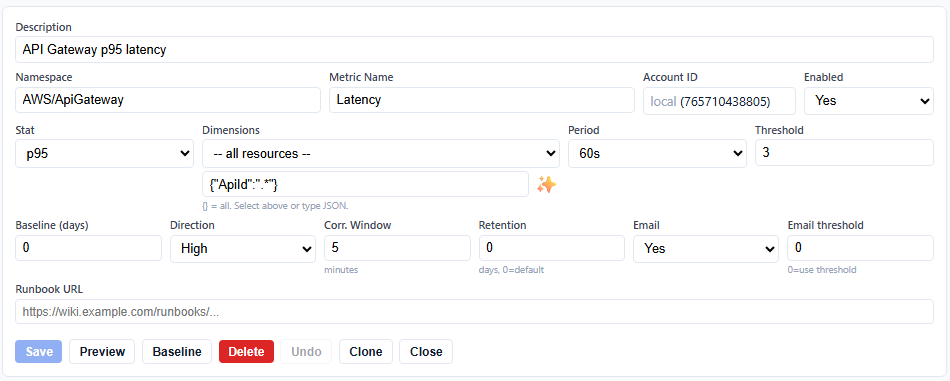
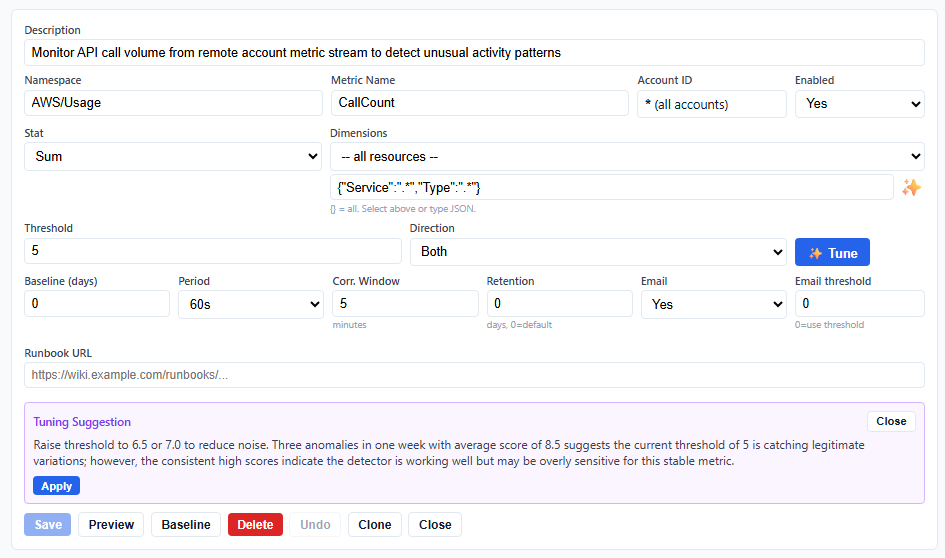
Yes. Each subscription has an "Email" toggle (on/off) and an "Email threshold" (0-10). Set Email to No for fully silent recording — anomalies are stored in DynamoDB and visible in the editor but no notifications are sent. Or set Email threshold to 5.0 to only receive emails for significant anomalies while low-severity ones are recorded silently.
The subscription list shows arrows indicating anomaly frequency trends: ▲ red (worsening — more anomalies this week than last), ▼ green (improving — fewer this week), ▶ grey (stable), ★ blue (new — no prior week data). A persistently worsening trend suggests a systemic issue beyond individual alert triage.
Typical costs for a compact tier deployment with 20 active metrics: Metric Streams ~$3/mo, Firehose ~$1/mo, S3 ~$0.50/mo, Lambda (collector, detector, billing, discovery) ~$2/mo, DynamoDB ~$0.50/mo. Total infrastructure ~$7-12/mo on top of the software fee. OpenSearch is shared with Log Processor — no additional cluster cost. On advanced+ tiers, the Bedrock VPC endpoint adds ~$7/mo and AI suggestions cost ~$0.001 per query. Cross-account adds a Metric Stream per remote account (~$3/mo each).
A daily billing processor queries AWS/Billing EstimatedCharges data from OpenSearch, computes the day-over-day spend delta per service, and writes derived DailySpend metrics back. The detector then scores these like any other metric using day-of-week baselines. This means it learns that "Tuesdays cost more than Sundays" and only alerts on genuine cost spikes — not normal weekly patterns. Subscribe to AIMonitor/Billing / DailySpend with {"ServiceName": ".*"} to monitor all services independently.
A scheduled Lambda calls CloudWatch ListMetrics every 6 hours and caches all available namespaces, metrics, and dimension values. The editor merges this with a comprehensive AWS metrics catalog (40+ services) to show you everything you could monitor. Active metrics are highlighted; inactive ones can be shown via a toggle. Click "+ Subscribe" to pre-fill the form with smart defaults including wildcard dimensions and suggested thresholds. Click the ↻ refresh icon to update the cache on demand (~30 seconds) when you've added new resources.
Each report is a self-contained HTML page covering a configurable lookback window (default 7 days). It includes: total anomalies with severity breakdown (high/medium/low), anomaly trend direction per subscription, top anomalous metrics ranked by count, day-of-week distribution, top dimensions (resources), per-account breakdown, cost analysis (daily spend vs 7-day average with % change), maintenance window details (type/schedule/duration/suppressed count), baseline training status, and full system health checks across all Lambda functions. View a sample report
On advanced and enterprise tiers, DynamoDB point-in-time recovery (PITR) is automatically enabled. This provides continuous backups with restore capability to any second within the last 35 days. Baselines, anomaly history, and maintenance state are all protected. On lower tiers, baselines rebuild automatically from incoming data within 1-2 weeks if lost.
AI features require Amazon Bedrock model access. In the AWS Console, go to Bedrock → Model access → Modify model access → enable Anthropic Claude models and submit the use case form. Activation takes approximately 15 minutes. Once approved, AI suggestions in the discovery wizard and anomaly explanations in alerts will work automatically. AI features are available on advanced and enterprise tiers only.
On advanced and enterprise tiers, the discovery wizard shows a natural language prompt. Type something like "monitor my Lambda errors" or "alert me if S3 costs spike" and Bedrock (Claude) returns a fully-configured subscription suggestion based on your actual available metrics. Lower tiers get the same suggested prompts as clickable chips that pre-fill the form using hardcoded smart mappings — no AI call needed.
On advanced and enterprise tiers, each anomaly alert includes an AI-generated analysis section. Bedrock (Claude) receives the anomaly context — metric name, current value, baseline mean, score, and any correlated metrics — and produces a 2-3 sentence explanation: likely cause, what to investigate first, and whether it's probably a real issue or noise. Labeled "AI Analysis (experimental)" in the email. Costs ~$0.0003 per alert.
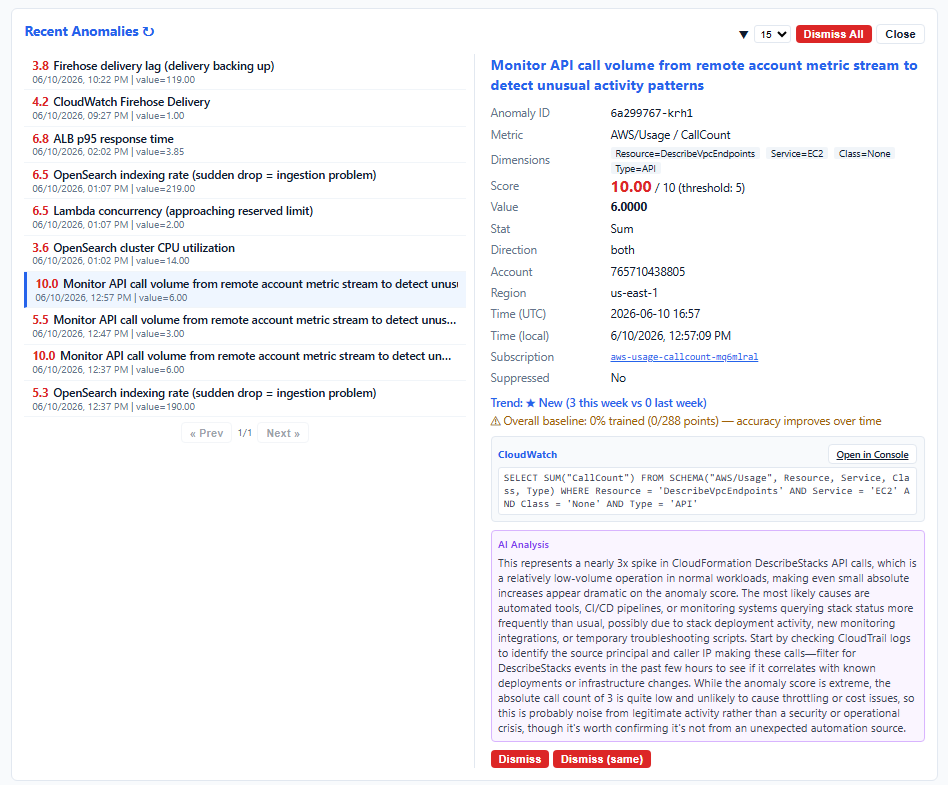
On advanced and enterprise tiers, in Recent Anomalies, click on the subscription link to view its details, click the "Tune" button and Bedrock (Claude) leverages recurring anomaly history and suggests changes which you can apply, costs ~$0.0003 per tune.
Yes. If cross-account metric streams include AWS/Billing from linked accounts, the billing processor computes per-account per-service deltas. Alerts include the account ID so you know exactly which account is spending more. Note: AWS/Billing metrics only exist in the payer (management) account unless billing access is delegated to member accounts.
Guides and reference materials
Prerequisites, deployment, post-setup, and first subscription walkthrough.
Comprehensive reference covering creating users, groups and supporting SSO.
Subscription editor UI reference: fields, preview, discovery, maintenance, reports.
Comprehensive reference covering monitoring features, and configuration, and operations.
Helper scripts: users, groups, support-bundle, cross-account setup (cmd + sh).
Included with all subscriptions: documentation, bug fixes, security patches, and support.
Professional services: consulting@perfware.cloud
Built and supported by engineers with 10+ years of hands-on AWS experience spanning enterprise architecture, security, performance engineering, automation, infrastructure, and software development.