
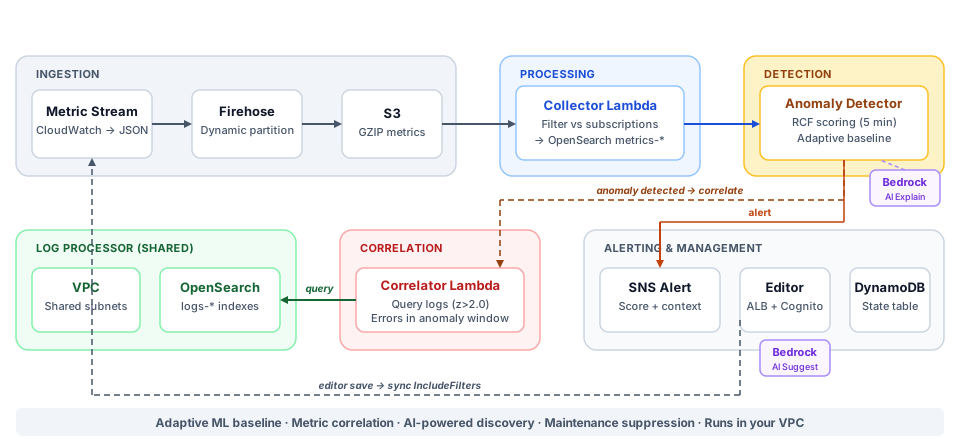
Monitoring without the guesswork — or the per-metric bill
No manual thresholds — ML learns what's normal per metric and alerts on deviations. Flat monthly fee with zero per-metric charges; you pay AWS at cost. Runs entirely in your account and shares your existing Log Processor infrastructure, so added AWS cost is minimal.
Subscribe on AWS Marketplace Contact usAI Monitor builds on the Perfware platform. It requires Log Processor for shared infrastructure.
Log Processor provides the shared VPC and OpenSearch domain that the AI Monitor deploys onto (no new cluster), sharing saves you money on infrastructure costs.
Together they cover the full kill chain. AI Monitor tells you something is wrong; Log Processor tells you why. Detections reach AI Monitor, adding application-layer coverage that infrastructure tools can't see.
Subscribe to metrics, let ML learn, get alerted when something deviates. The highlights below — full reference in the documentation.
No manual thresholds. Per-day-of-week models learn that "Mondays are busier than Sundays," so weekly cycles stop creating false positives. Adapts continuously — no retraining needed.
When an anomaly fires, automatically checks what else deviated in the same window. The alert includes correlated metrics — "CPU spiked and 3 other metrics were also anomalous."
Describe what you want to monitor in natural language and get a ready-to-use subscription. Get plain-language anomaly explanations and apply data-driven tuning recommendations with one click (advanced+ tiers).
A daily billing processor computes day-over-day spend deltas per AWS service and flags unusual spikes against day-of-week baselines — "RDS costs 3x more than a normal Thursday."
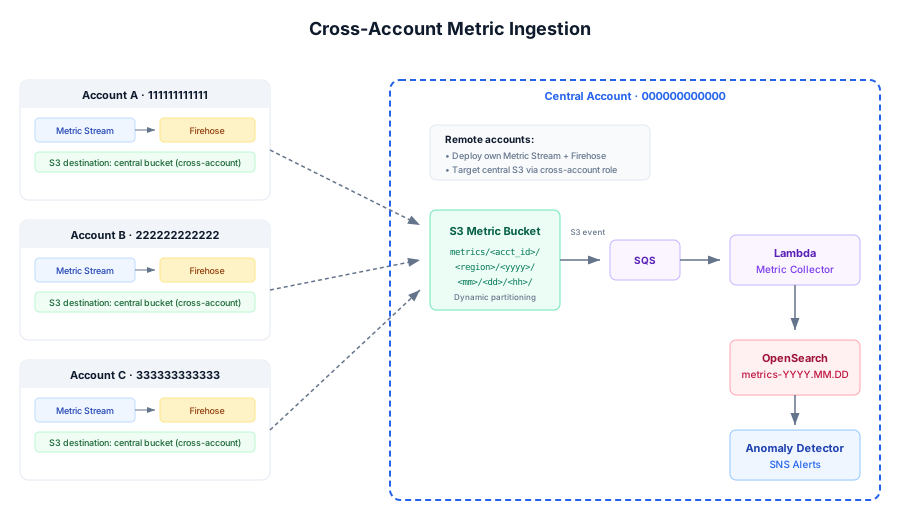
Remote accounts stream metrics into your central pipeline — full visibility from one pane (advanced+ tiers).
Schedule recurring or one-time maintenance windows so planned deployments don't generate alert noise — anomalies are recorded but suppressed.
Metric stream ingestion, the subscription editor, reports, RBAC & SSO, dynamic stream filtering, and the complete reference live in the docs hub.
Two products, one story. AI Monitor detects metric anomalies; Log Processor surfaces the root cause from your logs. AI Monitor deploys as a guest on Log Processor's VPC and OpenSearch — shared infrastructure, zero duplication, visibility across metrics and logs.
Subscribe in Marketplace, read the Getting Started guide, setup your account, and launch the CloudFormation. Provide your Log Processor stack name and tier.
Open the editor, browse namespaces, select metrics. The Metric Stream starts flowing.
The detector builds a model per metric over the training period (7-14 days). Training alerts during this phase.
Once baseline is ready, deviations trigger alerts with anomaly score + correlated metrics.
Software fee only. AWS infrastructure costs (Firehose, S3, Lambda) billed directly by AWS.
Yes. AI Monitor deploys as a guest on a running Log Processor stack — it uses the same VPC, subnets, and OpenSearch domain. Log Processor owns the cluster; AI Monitor writes to its own OpenSearch index pattern (metrics-*) and reads other metric baselines for correlation. Sharing this infrastructure is what keeps your added AWS cost minimal.
No. Everything runs inside your VPC. Metric Streams → Firehose → S3 → Lambda → OpenSearch — all within your account. The only external call is a periodic Marketplace entitlement check.
A flat monthly software fee per tier (see Pricing) with zero per-metric charges. AWS infrastructure (Firehose, S3, Lambda) is billed directly by AWS at cost, and because AI Monitor shares your existing Log Processor stack's VPC and OpenSearch, there's no additional cluster cost. See the documentation for a detailed infrastructure cost breakdown.
No. AI Monitor's AI features — anomaly explanations, tuning suggestions, and report summaries (advanced tier and above) — run on Amazon Bedrock inside your own AWS account and Region, called by the stack's own Lambda role. Nothing is sent to us or to the model provider, and per AWS's Bedrock terms your prompts are never used to train the models. We also keep resource identifiers out of the prompts, never the specific values, account IDs, or Regions. AI features are optional.
More questions? See the documentation →
The full reference — features, configuration, and the complete FAQ — lives on the documentation hub. Deployment and guide downloads below.
Prerequisites, deployment, post-setup, and first subscription walkthrough.
Subscription editor UI reference: fields, preview, discovery, maintenance, reports.
Reference for OpenSearch dashboards, queries, and troubleshooting.
Comprehensive reference covering creating users, groups.
Comprehensive reference supporting SSO.
Comprehensive reference covering monitoring features, and configuration, and operations.
Release notes and updates.
Pre-sales enquiries. Questions about AI Monitor, licensing, or professional services? Contact us →
Already a customer? Product support is available from the Support button on your deployed application's landing page (alongside the Subscription Editor and OpenSearch Dashboards, per your plan's SLA), or email support@perfware.cloud.