
Ingest, search, and analyze your CloudWatch logs with Athena, OpenSearch, and pre-built dashboards. The solution runs entirely in your AWS account — no data leaves your VPC.
Subscribe on AWS Marketplace Learn MoreDeploy a production-ready log processing pipeline via CloudFormation, fully configured.
CloudWatch → Firehose → S3 with configurable buffering and GZIP compression - cross-account capable.
Full-text search with pre-built dashboards, index patterns, and ISM retention policies.
Query logs with SQL via partition-projected Glue tables with pre-built queries — no crawlers needed.
Regex-based log group matching with per-stream routing to different indexes. Subscription management enhanced with queriable user provided metadata name/value pairs.
Retention policies for S3 buckets, CloudWatch Logs, Datalake, OpenSearch — by default, retaining logs forever silently grows your bill.
Built-in web UI for managing log group subscriptions hosted in S3 (essential tier and above) — add log groups, configure streams, set log retention, and edit pattern rules. Regex validation, version history with rollback, and diff preview before saving — no redeployment needed. Protected by Cognito auth.
Search by field, not by string. Ingest pipelines automatically extract structured fields (IP addresses, status codes, request IDs, latencies, error levels) at index time, turning every log line into a queryable document. Filter by HTTP 500s, sort by response time, aggregate errors by service — without writing a single parser. 14 built-in pipelines cover Lambda, JSON, Nginx, Tomcat, Spring, VPC Flow, ALB, EKS, CloudFront, RDS, and more. Parsing runs server-side on the cluster — no Lambda overhead, no additional cost, no code to maintain. Raw messages always preserved. Add custom pipelines via the OpenSearch API for proprietary formats.
ALB + Cognito + Nginx proxy for secure OpenSearch Dashboards access.
Lambda errors, DLQ depth, Firehose freshness, OpenSearch health — all with SNS email.
Runs in isolated subnets with VPC endpoints — no internet egress. At rest encrypted — FedRAMP/HIPAA ready.
Role-based access control is available on Advanced and Enterprise tiers. When enabled, editor access is controlled by Cognito group membership.
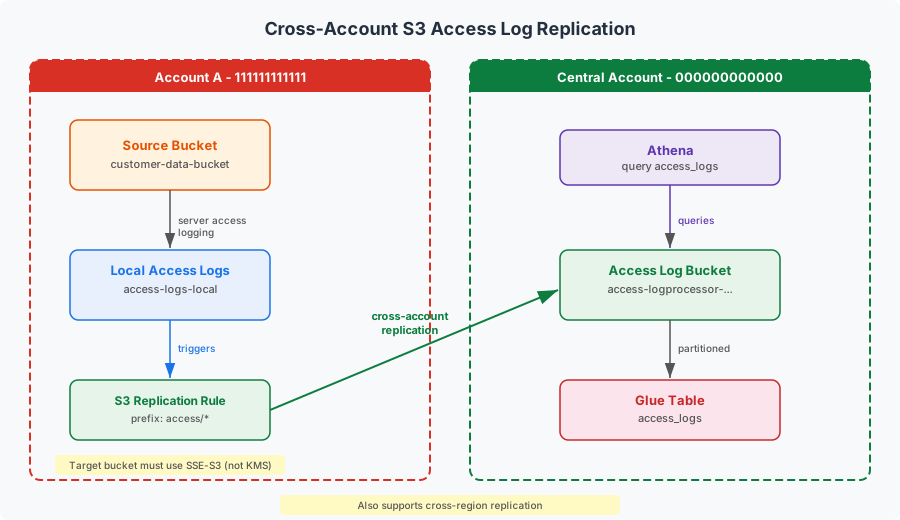
Dedicated access log bucket tracks every request to your log and datalake buckets, also add your own S3 buckets. Queryable via Athena with date-partitioned Glue tables for compliance auditing — know who accessed what data and when - cross-region and cross-account capable.
Pre-built dashboard with Alarms, Billing, logs, alarm state, Lambda, SQS, Firehose, OpenSearch, per-index metrics — pattern detections and filtered metrics also emitted.
Automated weekly compliance reports on a configurable schedule. Summarizes event volume, pattern detections by type and severity, top log groups, and system health — DLQ depth, Lambda errors, OpenSearch status, Firehose lag — each with traffic-light indicators. Reports are saved to S3 and emailed via SNS with a pre-signed download link. Essential for organizations subject to SOC 2, HIPAA, PCI-DSS, or internal security audits — provides documented evidence of what was processed, what was detected, and whether the pipeline was healthy. Generate on demand or on schedule (advanced tier and above).
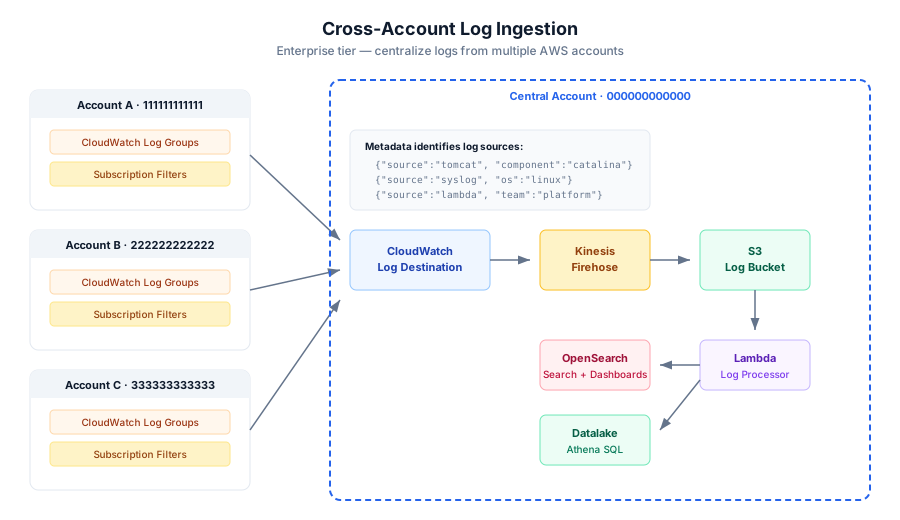
Centralize logs from multiple AWS accounts into a single pipeline. Configure trusted account IDs and set up CloudWatch Logs destinations for cross-account subscription filters. Each account’s logs are automatically tagged with the source account ID and queryable via user-defined metadata in both OpenSearch and Athena.
Centralize S3 access logs from multiple AWS accounts into a single pipeline.
Find Log Processor on AWS Marketplace and subscribe.
Deploy the CloudFormation stack selecting your tier, domain, and certificate ARN.
Configure your log subscriptions and start querying.
Essential tier and above include OpenSearch — the domain initializes automatically during deployment (~15-25 minutes).
Software fee only. AWS infrastructure costs are billed directly by AWS to your account.
No. Everything runs inside your VPC with isolated subnets and no internet egress. Logs flow from CloudWatch → Firehose → S3 → Lambda → OpenSearch/Athena, all within your account. AWS services are accessed exclusively through VPC endpoints — no data ever leaves your network boundary. The seller has no access to your account, data, or infrastructure. The only external call is a periodic entitlement check to AWS Marketplace to verify your subscription.
Yes. The Basic tier runs datalake-only — query logs with Athena SQL at approximately $5/month AWS infrastructure cost. Essential and above add OpenSearch for full-text search and dashboards. Subscriptions can target Athena and/or OpenSearch independently, so you can route verbose or high-volume logs to the datalake only (keeping OpenSearch costs low) while sending critical application and audit logs to both for real-time search and visualization.
Use the subscription editor (Essential tier and above) to add log groups, configure stream routing, set retention, and define pattern rules — all from a browser with regex validation and diff preview before saving. On Basic tier, update the subscriptions JSON file directly in the assets S3 bucket. Changes are picked up automatically — no redeployment needed. Version history is maintained in S3, so you can revert to any previous configuration.
Your data remains in S3 and OpenSearch. Snapshot buckets can be retained for disaster recovery.
Yes. Each index type (app, audit) has retention defaults per tier, feel free to adjust them based on your needs. Both OpenSearch and the S3 datalake have independent retention policies. You can also enforce CloudWatch Logs retention per subscription entry using the retentionDays field — specific entries override broader regex patterns. By default, CloudWatch log groups retain logs indefinitely at $0.03/GB/month. Without retention policies, storage costs grow silently and can become a significant expense.
Yes. Select a tier upgrade or downgrade (Essential | Advanced | Enterprise) and update the stack — node count, instance type, and volume changes are handled in-place via OpenSearch blue/green deployment with zero downtime (typically 15-30 minutes). Feature differences activate immediately based on your Marketplace entitlement dimension. Upgrading from Basic to Essential requires a stack delete and fresh deploy since it adds an OpenSearch domain, VPC, and dashboards infrastructure that cannot be added to an existing Basic stack. Your OpenSearch and S3 datalake remain unaffected during any tier change.
Yes. Select a tier and provide a unique stackname. Each stack deploys into its own VPC with isolated resources, so you can run multiple instances side by side without interference - AWS limits apply. This is useful for separate environments (e.g. dev vs prod) or different teams with distinct log management needs - refer to the getting started guide for details.
Yes, on the Enterprise tier. Provide the trusted account IDs during deployment. Each source account must create a CloudWatch Logs subscription filter pointing to the cross-account destination. Additionally, external accounts can replicate their S3 access logs to your stack's access log bucket using S3 replication rules — use the provided script(s) to configure partitioned access logging, IAM roles, and cross-account replication in minutes. All logs flow into the same pipeline — searchable in OpenSearch and queryable in Athena alongside your primary account's logs.
Use the provided support-bundle script contained in the downloadable scripts.zip file. It collects CloudFormation state, Lambda logs and configuration, SQS queue depths, OpenSearch health, Firehose delivery status, CloudWatch alarms, S3 bucket status, VPC endpoints, and the current subscriptions configuration. The output is a timestamped folder — zip it and email. No sensitive log data is collected, only resource metadata and operational metrics.
Yes. Add your SAML or OIDC identity provider to the Cognito User Pool using the sso helper script. Users will see a “Sign in with [Provider]” button on the login page. After first login, assign groups with groups for role-based access. See the helper scripts README for details.
The default deployment uses isolated VPC subnets with no internet egress, KMS encryption at rest for all S3 buckets, SQS queues, and the datalake, S3 access logging for request auditing, and TLS-enforced secure transport on all bucket policies. All AWS service communication routes through VPC endpoints — no data traverses the public internet. This architecture meets network isolation requirements for FedRAMP, HIPAA, PCI-DSS, and SOC 2 compliance frameworks out of the box, with no additional configuration required.
50++ context-aware regex patterns scan log messages inline during processing. Built-in patterns cover identity (SSN, passport, driver's license, DOB), financial (credit card with Visa/Mastercard validation, IBAN), contact (email, phone, IP address), credentials (AWS access keys, secret keys), and SQL (SELECT, INSERT, DROP, injection attempts). Each pattern is categorized by type (PHI, PII, Financial, Secret, SQL) and severity (High, Medium, Low). Configure per stream to redact (mask sensitive values), filter (drop matching events entirely), or tag (annotate for downstream alerting). Add your own custom patterns with category and severity in the subscription editor — no code changes or redeployment needed. Detected patterns are queryable in both OpenSearch and Athena.
The built-in scanner provides regex-based detection at zero additional cost — no external API calls, no per-scan fees, and no data leaves your VPC. All detections are indexed as structured fields queryable in both OpenSearch and Athena, enabling you to search for specific pattern types across your entire log history. Advanced and Enterprise tiers emit per-pattern CloudWatch metrics with category and severity dimensions for real-time alerting and dashboarding. For organizations requiring ML-powered entity recognition or natural language processing (Amazon Comprehend, Amazon Macie, or other NLP services), custom integration is available as a professional services engagement.
On Advanced or above tiers, each pattern detection is emitted as a CloudWatch metric with PatternName, Category, and Severity dimensions. This enables multi-dimensional querying — graph individual patterns over time (e.g. "SSN detections per hour" vs "email detections per hour"), aggregate by severity ("all High severity detections in the last 24 hours"), or slice by category ("all PHI detections across all log groups"). Build targeted CloudWatch dashboards, set threshold alarms on specific patterns, and correlate detection spikes with deployment events. Aggregate pattern metrics (total detections and filtered counts) are available on all tiers at no additional cost.
Yes. On Advanced or above tiers, create a CloudWatch alarm on any pattern metric dimension — for example, "alert when SSN detections exceed 10 in 5 minutes" or "alert on any High severity detection." Route alarms to the stack's SNS topic for email notifications. Navigate to CloudWatch → Alarms → Create Alarm, select your stack's metric namespace, filter by PatternName, Category, or Severity dimension, and configure your threshold.
Raw log messages are unstructured text — searching them is like reading a book without an index. Ingest pipelines automatically extract structured fields (IP addresses, status codes, request IDs, latencies, error levels) at index time, turning every log line into a queryable document. Filter by HTTP 500s, sort by response time, aggregate errors by service — without writing a single parser.
Each subscription stream can specify a pipeline name (e.g. "lambda", "nginx", "json"). Parsing runs server-side on the OpenSearch cluster during indexing — no Lambda processing overhead, no additional cost, no code to maintain. The raw message is always preserved alongside extracted fields, so you never lose data. If parsing fails (malformed input, unexpected format), the event is indexed unchanged — no data loss.
14 built-in pipelines cover the most common AWS and application log formats: Lambda, JSON, Nginx, Apache, Syslog, Tomcat, Spring Boot, VPC Flow Logs, ALB, API Gateway, RDS slow queries, EKS/Kubernetes, CloudFront, and RDS PostgreSQL. Create custom pipelines for proprietary formats via the OpenSearch Dev Tools console — they're immediately available to any subscription stream. Pipelines only affect OpenSearch; datalake writes remain raw for Athena query-time parsing.
The stack's SNS topic supports any endpoint type — add your own subscriptions via the AWS Console. For example, add a Slack incoming webhook URL (HTTPS), PagerDuty integration endpoint, an SQS queue for automation, or a Lambda function for custom routing. Navigate to SNS → Topics → select your stack's notification topic → Create subscription. No changes to the stack or parameters needed.
On Advanced and above tiers, the log processor can generate an email an HTML compliance report on a configurable schedule. Reports summarize the past 7 days and include:
Reports are saved to the datalake S3 bucket under reports/ and a pre-signed download link is emailed via the alarm SNS topic. Configure which days to auto-generate (e.g. Monday and Friday) in the Subscription Editor, or generate on demand with the Report button. View a sample report.
A pre-built dashboard is deployed automatically with your stack. It includes:
Note: The Estimated Costs widgets require Receive Billing Alerts to be enabled in the AWS Billing console (Settings → Billing Preferences). Billing metrics update approximately every 6 hours.
The AWS-managed automated snapshots (hourly, 14-day retention, free) are sufficient for disaster recovery. The custom S3 snapshot repo is mainly useful for: Long-term archival beyond 14 days, Cross-region restore (copy the S3 bucket) or Pre-upgrade backup (snapshot before a major change). Use the provided (.cmd/.sh) script, e.g. snapshot.cmd helper script to take a snapshot on demand.
Two indexes keep the cluster simple and cost-effective. app holds application logs with short retention (default 30 days), while audit holds compliance-sensitive logs with long retention (default 365 days). Each subscription stream routes to one of these indexes, so you control retention and access per log type without managing dozens of indexes. Fewer indexes mean lower shard count, less JVM pressure, and faster cluster recovery. For further separation, attach custom metadata fields to every log event for source filtering, and leverage OpenSearch pipelines for automatic field processing.
Retention is managed independently at each layer of the pipeline, reducing the complexity of managing storage costs and compliance requirements:
retentionDays in your subscription file. Without this, CloudWatch retains logs forever at $0.03/GB/month. Enforced automatically on each subscription run.app indexes delete after 30 days, audit after 365 days. Configurable in your deployment profile.All retention periods are specified in your deployment tier (basic, essential, advanced, enterprise).
Included with all subscriptions: documentation, bug fixes, security patches, and support.
Report bugs, request features, and track issue resolution on our public GitHub support repository. Search existing issues before opening a new one.
View on GitHub →Built and supported by engineers with 10+ years of hands-on AWS experience spanning enterprise architecture, security, performance engineering, automation, infrastructure, and software development.